When I began this project, the obvious answer was that it could not be done.
Game of Active Directory (GOAD) expects a conventional virtualization provider such as VirtualBox, VMware, Proxmox, Azure, AWS, or Ludus. Modal is a serverless compute platform, not a supported GOAD provider. GOAD needs five Windows virtual machines, private networking, persistent disks, several reboots, and a long Ansible provisioning sequence. Those requirements do not resemble a normal short-lived serverless workload.
The breakthrough was to stop asking, “How do I make Modal a GOAD provider?” and ask a different question:
Can one on-demand Modal VM Sandbox act as the Linux hypervisor for the entire lab?
The answer was yes, with an important qualification. In my deployment, nested KVM was unavailable, so the Windows guests had to run through QEMU’s software accelerator, TCG. That is slower than hardware-assisted virtualization, but it gave me a real, complete five-machine GOAD environment that starts only when someone needs it, preserves its disks between sessions, and shuts itself down on a timer.
This article explains the architecture, the build procedure, the mistakes, and the operational controls I used. It is not an official GOAD provider and it is not an official Orange Cyberdefense or Modal reference architecture. It is a practical account of the custom implementation I built.
Safety warning: GOAD is intentionally and extremely vulnerable. Its maintainers explicitly warn against exposing it to the Internet without isolation. Use a dedicated Modal environment, publish only authenticated access services, restrict the VPN to the lab subnet, and never connect the GOAD bridge to a production network. The Windows images are evaluation systems; review the GOAD licensing note and Microsoft’s terms before use.
Public-template note: Every externally visible App, Environment, Volume, Secret, and Sandbox name in this article is a generic example and does not identify the live Transilience deployment. Choose new, non-production names for your own installation. The bundled local-account portal is an instructional starting point and permits self-service signup; place it behind organizational SSO, an invite/allowlist control, or another access gateway before exposing a cost-bearing lab to the public Internet.
What “full GOAD” means
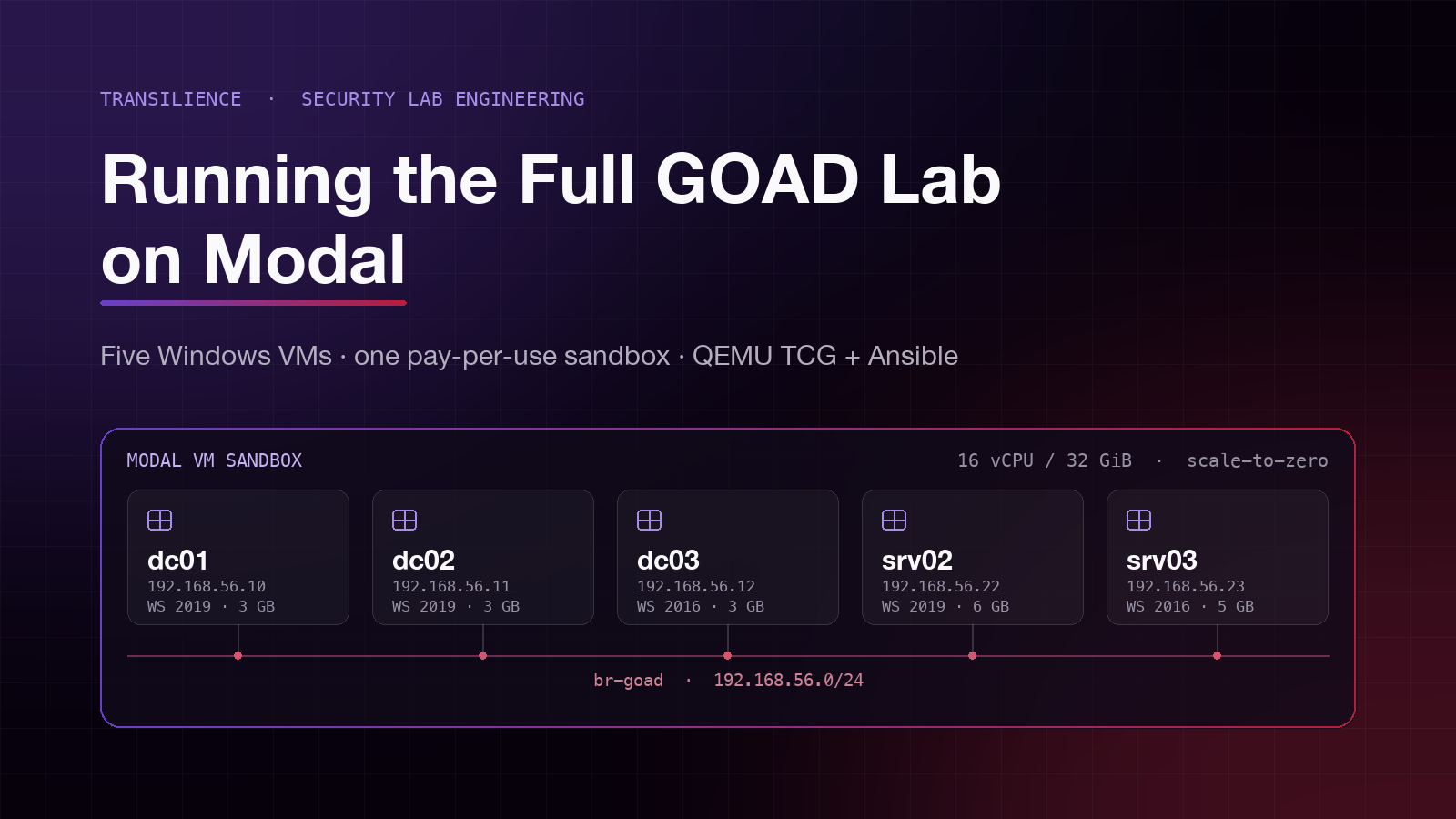
I deployed the full GOAD lab, not GOAD-Light or GOAD-Mini. The official GOAD topology contains five Windows servers, two forests, and three domains.
| Guest | Lab IP | Guest RAM | Base image |
|---|---|---|---|
dc01 | 192.168.56.10 | 3 GB | Windows Server 2019 |
dc02 | 192.168.56.11 | 3 GB | Windows Server 2019 |
dc03 | 192.168.56.12 | 3 GB | Windows Server 2016 |
srv02 | 192.168.56.22 | 6 GB | Windows Server 2019 |
srv03 | 192.168.56.23 | 5 GB | Windows Server 2016 |
Each guest receives two virtual CPUs. The guests consume 20 GB of RAM in total, so I gave the outer Modal Sandbox 16 physical CPU cores and 32 GB of memory. GOAD’s own installation guidance recommends at least 24 GB of RAM for the full lab and roughly 115 GB of available storage when base images and working disks are included. See the GOAD installation documentation before sizing your deployment.
The architecture
The final design uses one Modal App and two persistent Modal Volumes:
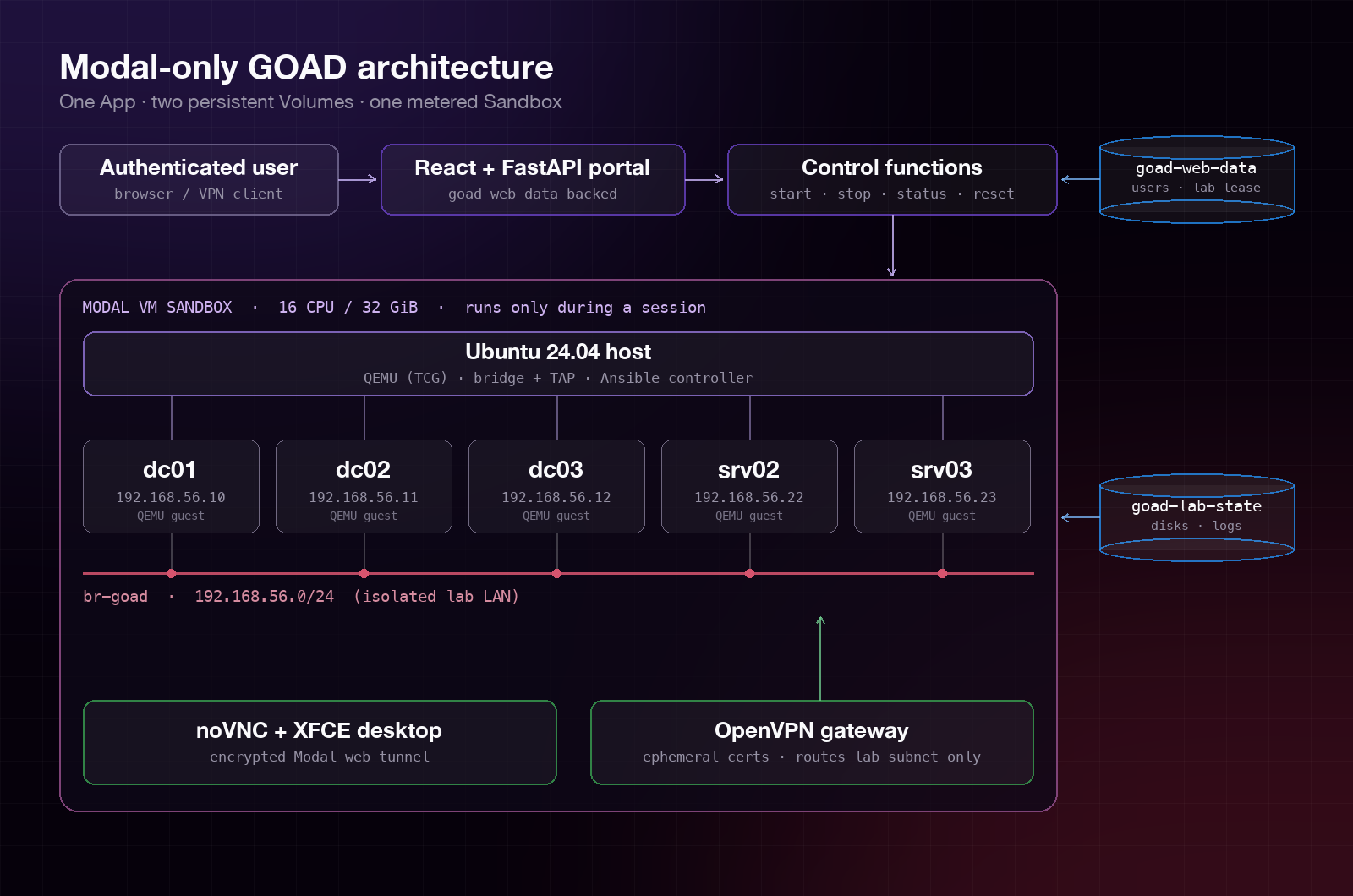
The important separation is:
- Ephemeral compute: the 16-core Sandbox exists only while a lab session is active.
- Durable lab state: Windows base disks, copy-on-write guest disks, Ansible markers, logs, and status live on
goad-lab-state. - Durable portal state: users, login sessions, and the current lab lease live on
goad-web-data. - Ephemeral secrets: the VPN CA, server certificate, client certificate, and current tunnel address live only inside the active Sandbox.
- Scale-to-zero control plane: start, stop, status, reset, extend, logs, and the web portal use small Modal Functions with no permanently warm containers.
This preserved Modal’s pay-per-use model without pretending that five Windows guests are lightweight serverless functions.
Why the straightforward approaches failed
Treating Modal as Proxmox
GOAD’s Proxmox provider assumes that a Proxmox cluster already exists. Running Terraform or the GOAD Proxmox scripts inside a Modal container does not create that hypervisor. The scripts still need a reachable Proxmox API, storage pool, bridge, templates, and a network path to the resulting Windows machines.
That route was useful for understanding GOAD’s provider boundary, but it did not produce a Modal-only deployment.
Dockerizing GOAD
Docker can package the Linux controller, Ansible, and the portal. It cannot turn Windows Server guests into Linux containers. Active Directory behavior, Windows reboots, services, domain joins, trusts, and AD CS still require Windows kernels.
One Modal container per Windows machine
This makes persistence and private Layer 2 networking harder, and it multiplies orchestration and billing complexity. I instead placed all five guests in one large Sandbox and created the lab network locally with a Linux bridge and TAP devices.
Assuming /dev/kvm would exist
Modal VM Sandboxes provide a real Linux kernel, which is why bridge, TAP, iptables, OpenVPN, and QEMU work normally. In my Sandbox, however, nested KVM was not exposed. I therefore used:
-accel tcg,thread=multi,tb-size=256
-cpu max
TCG is the main performance trade-off in this design. Initial provisioning is measured in hours rather than minutes, and Windows servicing or reboots need patient retry logic.
Step 1: Prepare Modal and isolate the deployment
Install the Modal CLI and authenticate, following Modal’s getting-started guide:
python3 -m venv .venv
source .venv/bin/activate
python -m pip install --upgrade modal
modal setup
Create a dedicated environment. I used goad-lab; choose a different name if that is already used by another application.
modal environment create goad-lab
Modal Environments separate Apps, Secrets, and storage namespaces. I passed -e goad-lab to every destructive or deployment command rather than relying on a default profile. Modal documents this behavior in its Environments guide.
Create the two Volumes and the VNC secret:
modal volume create -e goad-lab goad-lab-state
modal volume create -e goad-lab goad-web-data
VNC_PASSWORD="$(openssl rand -hex 4)"
modal secret create -e goad-lab goad-lab-auth \
  GOAD_VNC_PASSWORD="$VNC_PASSWORD"
unset VNC_PASSWORD
Do not commit the password to source control. Modal’s Secrets documentation explains how named secrets are injected into functions and Sandboxes.
In the Modal App, bind every lookup explicitly to the same environment:
import modal

APP_NAME = "goad-on-modal"
ENVIRONMENT = "goad-lab"

app = modal.App(APP_NAME)
state = modal.Volume.from_name(
    "goad-lab-state",
    environment_name=ENVIRONMENT,
    create_if_missing=True,
)
portal_data = modal.Volume.from_name(
    "goad-web-data",
    environment_name=ENVIRONMENT,
    create_if_missing=True,
)
auth = modal.Secret.from_name(
    "goad-lab-auth",
    environment_name=ENVIRONMENT,
    required_keys=["GOAD_VNC_PASSWORD"],
)
Avoid cross-environment lookups and generic Volume names. A vulnerable lab should never share state or credentials with another application by accident.
Step 2: Use a reproducible source layout
My reference implementation is organized like this:
modal_lab.py              # Modal App, images, controller functions, ASGI endpoint
lab_host.py               # QEMU, networking, VPN, desktop, Ansible, shutdown supervisor
inventory.goad-modal      # Static GOAD IP/WinRM inventory overlay
qemu_probe.py             # One-VM proof and Server 2019 base-image import
import_goad_boxes.py       # Remaining Server 2016 imports
lab_client.py             # Small operator CLI
portal_api.py              # FastAPI auth, lease, and controller API
goad-patches/              # Pinned compatibility fixes
goad-portal/               # React/Vite user interface
I pinned GOAD to a tested commit instead of building from a moving default branch:
GOAD_COMMIT = "992307adf944b934a3b76a2f56a637104c54b805"
That pin matters because this implementation patches a few provisioning tasks for the slower TCG environment. If you update GOAD, test the entire provisioning sequence again and re-evaluate every patch. Do not silently apply old patches to new upstream code.
Step 3: Build the Ubuntu host image
The outer host is Ubuntu 24.04 with Python 3.11. Its image includes:
- QEMU system emulation and
qemu-img; - bridge, TAP,
iproute2, and iptables tooling; - OpenVPN and OpenSSL;
- TigerVNC, noVNC, websockify, and XFCE;
- Git and the pinned GOAD checkout;
- Ansible Core 2.18,
pywinrm, NTLM support, and GOAD’s Galaxy dependencies.
A shortened version of the image definition is:
import modal

host_image = (
    modal.Image.from_registry("ubuntu:24.04", add_python="3.11")
    .env({"DEBIAN_FRONTEND": "noninteractive"})
    .apt_install(
        "bridge-utils", "curl", "git", "iproute2", "iptables",
        "openvpn", "openssl", "qemu-system-x86", "qemu-utils",
        "tigervnc-standalone-server", "novnc", "websockify",
        "xfce4", "xfce4-terminal",
    )
    .run_commands(
        "git init /opt/GOAD",
        "git -C /opt/GOAD remote add origin "
        "https://github.com/Orange-Cyberdefense/GOAD.git",
        f"git -C /opt/GOAD fetch --depth 1 origin {GOAD_COMMIT}",
        "git -C /opt/GOAD checkout --detach FETCH_HEAD",
        "python -m venv /opt/GOAD/.venv",
        "/opt/GOAD/.venv/bin/pip install ansible-core==2.18.0 "
        "ansible_runner pywinrm requests-ntlm rich psutil Jinja2 pyyaml",
        "cd /opt/GOAD/ansible && "
        "/opt/GOAD/.venv/bin/ansible-galaxy install -r requirements_311.yml",
    )
    .add_local_file("lab_host.py", "/opt/goad-modal/lab_host.py", copy=True)
    .add_local_file("inventory.goad-modal", "/opt/goad-modal/inventory", copy=True)
    .add_local_dir("goad-patches", "/opt/goad-modal/patches", copy=True)
)
Building GOAD into the Modal Image keeps the large, mostly immutable Linux toolchain out of the persistent lab Volume. Only mutable lab data goes under /lab.
Step 4: Import the Windows base boxes once
GOAD normally lets Vagrant download and create its machines. I separated that “providing” phase from the later Ansible “provisioning” phase.
The importer runs in a temporary, small VM Sandbox. It downloads the Vagrant boxes with resume and retry support, extracts the first VMDK or VDI, validates it with qemu-img info, synchronizes the filesystem, and exits. The results are stored under:
/lab/base/windows_2019_2021.05.15/
/lab/base/windows_2016_2017.12.14/
/lab/base/windows_2016_2019.02.14/
These are the exact Vagrant box releases used by my pinned build:
| Local base directory | Source box |
|---|---|
windows_2019_2021.05.15 | StefanScherer/windows_2019 2021.05.15, VirtualBox |
windows_2016_2017.12.14 | StefanScherer/windows_2016 2017.12.14, VirtualBox |
windows_2016_2019.02.14 | StefanScherer/windows_2016 2019.02.14, VirtualBox |
In my implementation the import commands are:
python qemu_probe.py
python qemu_boot_probe.py
python import_goad_boxes.py
The proof script deliberately imports only one Windows Server 2019 box first. Before downloading every image, I used it to prove four assumptions:
- the Modal VM runtime exposed
/dev/net/tun; - QEMU TCG could boot the Windows disk;
- the Modal Volume could preserve large base files;
- WinRM could be reached through QEMU’s user-mode NAT forwarding.
Only after that test succeeded did I import the remaining boxes. This staged approach saved a great deal of time while debugging.
Treat downloaded images as third-party artifacts: verify their source, hashes when available, license, and evaluation lifetime. The GOAD project currently states that its free Windows VMs have a 180-day evaluation period.
Step 5: Create persistent copy-on-write disks
The base disks must remain immutable. Each guest receives a persistent qcow2 overlay on the Modal Volume:
qemu-img create \
  -f qcow2 \
  -F vmdk \
  -b /lab/base/windows_2019_2021.05.15/base-disk.vmdk \
  /lab/vms/dc01/disk.qcow2
The real implementation detects whether the backing disk is VMDK or VDI. The critical rules are:
- keep the base and its overlay on the same durable Volume;
- never rename or modify a base disk after overlays reference it;
- create an overlay only when it does not already exist;
- call
syncbefore terminating the Sandbox; - perform a graceful Windows shutdown whenever possible.
This gives fast restarts and avoids duplicating several full base images for five guests.
Step 6: Build the private GOAD network
Inside the Sandbox I create one Linux bridge and five TAP interfaces:
ip link add br-goad type bridge
ip addr replace 192.168.56.1/24 dev br-goad
ip link set br-goad up

ip tuntap add dev tap-dc01 mode tap
ip link set tap-dc01 master br-goad
ip link set tap-dc01 up
Repeat the TAP steps for all five machines. Every guest then receives two emulated E1000 adapters:
- A QEMU user-mode NAT adapter with host-local forwarding for WinRM and RDP. The host supervisor uses this path during early boot and network repair.
- A TAP adapter on
br-goadwith the static192.168.56.xaddress used by GOAD and by learners.
The NAT ports bind to 127.0.0.1, not to the Sandbox’s public interface. The vulnerable Windows services therefore remain private.
A representative QEMU command looks like this:
qemu-system-x86_64
  -machine pc-i440fx-8.2
  -accel tcg,thread=multi,tb-size=256
  -cpu max
  -smp 2,sockets=1,cores=2,threads=1
  -m 3000
  -drive file=/lab/vms/dc01/disk.qcow2,if=ide,format=qcow2,cache=writeback
  -netdev user,id=nat0,hostfwd=tcp:127.0.0.1:15985-:5985
  -device e1000,netdev=nat0
  -netdev tap,id=lab0,ifname=tap-dc01,script=no,downscript=no
  -device e1000,netdev=lab0,mac=52:54:00:56:00:0a
  -display none
  -monitor unix:/run/goad-modal/dc01/monitor.sock,server=on,wait=off
  -daemonize
I configure the static lab NIC inside Windows through PowerShell over the NAT-side WinRM connection. This avoids depending on the private NIC being correctly configured before Ansible starts.
Step 7: Reuse GOAD’s Ansible provisioning
GOAD’s installation model separates template preparation, VM providing, and Ansible provisioning. Modal replaced the provider layer; I deliberately kept GOAD’s Ansible logic.
The host waits for WinRM on all five guests, merges GOAD’s generated inventory with my static IP overlay and runtime credentials, and then runs the playbooks in order:
[default]
dc01 ansible_host=192.168.56.10
dc02 ansible_host=192.168.56.11
dc03 ansible_host=192.168.56.12
srv02 ansible_host=192.168.56.22
srv03 ansible_host=192.168.56.23

[all:vars]
ansible_port=5985
ansible_winrm_transport=ntlm
ansible_winrm_server_cert_validation=ignore
Passwords are added to a mode-0600 runtime inventory under /run; they are not written into this static file or committed to source control.
PLAYBOOKS = (
    "build.yml",
    "ad-servers.yml",
    "ad-parent_domain.yml",
    "ad-child_domain.yml",
    "wait5m.yml",
    "ad-members.yml",
    "ad-trusts.yml",
    "ad-data.yml",
    "ad-gmsa.yml",
    "laps.yml",
    "ad-relations.yml",
    "adcs.yml",
    "ad-acl.yml",
    "servers.yml",
    "security.yml",
    "vulnerabilities.yml",
)
TCG changes the timing assumptions. Windows cumulative updates, domain promotion, AD replication, .NET installation, and SSMS setup may cause delayed reboots or temporary WinRM failures. My supervisor therefore:
- waits for all five machines concurrently;
- retries a failed playbook up to a bounded maximum;
- waits for WinRM again between attempts;
- refreshes the usable credential for each host after domain changes;
- records each successful playbook as a durable marker.
The markers are stored as files such as:
/lab/state/playbooks/01-build.yml.done
/lab/state/playbooks/02-ad-servers.yml.done
...
/lab/state/playbooks/16-vulnerabilities.yml.done
On restart, completed playbooks are skipped. This transformed first-time provisioning from one fragile, all-or-nothing job into a resumable workflow.
I also keep a small set of compatibility patches for the pinned GOAD revision. These handle tasks whose timeout, reboot, or prerequisite behavior was unreliable under slow software virtualization. Every patch is narrowly scoped and applied only after checking the expected upstream file. A mismatch should stop the build, not modify an unknown version.
Step 8: Start the metered Sandbox
The core Modal controller creates one named Sandbox:
sandbox = modal.Sandbox.create(
    "/opt/GOAD/.venv/bin/python",
    "/opt/goad-modal/lab_host.py",
    app=deployed_app,
    name="goad-host",
    image=host_image,
    secrets=[auth],
    cpu=16,
    memory=32768,
    timeout=23 * 60 * 60,
    volumes={"/lab": state},
    encrypted_ports=[6080],
    unencrypted_ports=[1194],
    readiness_probe=modal.Probe(tcp_port=6080, interval_ms=1000),
    experimental_options={"vm_runtime": True},
)
The vm_runtime option is essential for the real Linux networking and filesystem behavior this design uses. Modal documents VM Sandboxes as a beta feature, so verify the API before deploying a copy.
I set the Sandbox timeout to 23 hours, leaving margin below Modal’s documented 24-hour maximum. A separate in-guest timer defaults to six hours and can be extended in one-hour increments, but never beyond the outer 23-hour deadline. Modal’s Sandbox documentation describes timeouts and readiness probes.
The TCP readiness probe only means that the noVNC service is listening. It does not mean that five Windows machines are fully booted or provisioned. A separate durable status file reports the actual state:
starting -> booting -> network-ready -> provisioning -> ready
                                           |              |
                                           v              v
                                         error    stopping -> stopped
The portal polls that state and shows playbook progress instead of presenting a misleading “online” message too early.
Step 9: Provide browser desktop access
The host starts an XFCE desktop in TigerVNC on loopback and uses websockify/noVNC on port 6080:
vncserver :9 -localhost yes -geometry 1600x900 -depth 24
websockify --web=/usr/share/novnc 0.0.0.0:6080 127.0.0.1:5909
Port 6080 is exposed through an encrypted Modal Sandbox tunnel. The VNC password comes from the named Modal Secret. The resulting desktop is an isolated operator workstation from which a learner can use RDP, PowerShell, browsers, and assessment tools without connecting the lab subnet to their physical network.
Remember that Modal tunnel URLs are public if someone knows the URL. Authentication at the application or protocol layer is still required; Modal says the same in its tunnel security guidance.
Step 10: Add external access with an ephemeral VPN
For users who want to work from their own machine, the Sandbox also runs OpenVPN on TCP port 1194.
At every lab start, the supervisor generates:
- a new short-lived CA;
- a server certificate and key;
- one owner client certificate and key;
- a
tls-cryptkey; - a client profile containing those materials.
The VPN network is 10.77.0.0/24. The server pushes only this route:
route 192.168.56.0 255.255.255.0
The client profile also ignores redirect-gateway, so ordinary Internet traffic does not pass through the lab. The host enables forwarding only between tun-vpn and br-goad and applies source NAT for VPN clients reaching the GOAD subnet.
Modal’s raw TCP tunnel supplies a public hostname and random port. “Unencrypted” here means Modal does not wrap the TCP stream in its own TLS. OpenVPN still performs its own authenticated encryption.
A valid profile cannot be generated before the Sandbox starts because both its Modal tunnel endpoint and its VPN key material are session-specific. The UI can present VPN instructions before start, but the backend should enable the actual profile download only after the active Sandbox reports the VPN ready. Stopping the Sandbox destroys the keys and invalidates that downloaded profile.
On Linux or macOS with the OpenVPN client installed, the user connects with:
sudo openvpn --config transilience-goad.ovpn
After connection, verify the route and test a service:
ip route get 192.168.56.10
nc -vz 192.168.56.10 5985
On macOS, use route -n get 192.168.56.10 instead of ip route. A failed ping alone is not conclusive because Windows Firewall may block ICMP while TCP services remain reachable.
Do not expose RDP, SMB, WinRM, LDAP, Kerberos, or the bridge itself as separate public Modal tunnels. The authenticated VPN should be the only external path to 192.168.56.0/24.
Step 11: Build a small control plane
I exposed seven controller operations:
| Operation | Behavior |
|---|---|
start | Reuses the named Sandbox if it is already running; otherwise creates it with a requested session duration. |
status | Combines the persistent status file with live Sandbox and tunnel information. |
vpn_config | Inserts the current random tunnel host and port into the ephemeral client template. |
reset | Sends system_reset to every QEMU monitor socket without deleting disks. |
extend | Adds time to the in-guest session timer without exceeding the Sandbox deadline. |
stop | Requests Windows shutdown, waits, syncs disks, and terminates the billable Sandbox. |
logs | Returns a bounded tail of the host/provisioning log. |
These functions need only 0.25–0.5 CPU and 512 MB–1 GB RAM. I configured min_containers=0, max_containers=1, and a short scaledown window so they disappear after use. Modal’s autoscaling guide explains the cost/latency trade-off of warm containers.
The lab host is also limited to one named Sandbox. This prevents two users from unknowingly starting duplicate 16-core environments against the same disks.
Step 12: Put an authenticated portal in front of it
My final user experience is a React catalog and a FastAPI backend served from the same Modal App. The current catalog exposes only full GOAD; other labs are marked “Coming Soon.”
The reference portal includes:
- signup and login;
- PBKDF2-HMAC-SHA256 password hashing with per-user salts;
- random session tokens stored only as hashes;
HttpOnly,Secure,SameSite=Laxcookies;- rate limiting on authentication attempts;
- one exclusive lab lease;
- owner-only start, stop, reset, extend, desktop-password, and VPN access;
- a six-hour default countdown with a 23-hour hard ceiling;
- persistent SQLite data on the separate portal Volume.
The lease is important because the infrastructure is shared. If Karthik starts the lab, another logged-in user can see that it is occupied but cannot reset, stop, or download the owner’s VPN profile.
For a larger or public deployment, I would replace the local account system with organizational OIDC/SSO, add CSRF protection to every state-changing route, add audit events, enforce account approval, and store authorization policy outside the frontend. The browser is never the security boundary; the FastAPI routes must verify ownership again.
Modal supports FastAPI through an ASGI web function and assigns a public URL when the App is deployed. See Web Functions and Web Function URLs.
Step 13: Build, deploy, and operate
Build the frontend before deploying because the Modal Image copies the compiled Vite assets:
cd goad-portal
npm ci
npm run build
cd ..
Deploy the App to the isolated environment:
modal deploy -e goad-lab modal_lab.py
The CLI prints the portal’s public Web Function URL. Do not publish it until authentication, ownership checks, and secret handling have been tested.
Start and inspect the lab directly through Modal:
modal run -e goad-lab modal_lab.py --action start --session-hours 6
modal run -e goad-lab modal_lab.py --action status
modal run -e goad-lab modal_lab.py --action logs --lines 200
Or use the small client wrapper:
python lab_client.py start --session-hours 6
python lab_client.py status
python lab_client.py logs --lines 200
python lab_client.py extend
python lab_client.py reset
python lab_client.py stop
The first start is the expensive one: it creates overlays, boots all five evaluation servers, configures their private NICs, and runs the full Ansible chain. Later sessions reuse the completed overlays and durable markers, so they normally boot instead of reprovisioning everything.
Making “pay per use” real
Serverless does not automatically mean inexpensive. While this lab is active, it reserves a 16-core, 32-GB Sandbox. Modal says compute is billed by usage duration and that VM Sandbox memory is statically provisioned at the requested size. Check the current Modal pricing page and Sandbox resource documentation before estimating a session price.
These controls made the cost model predictable:
- One outer Sandbox, not five: all guests share the host and bridge.
- Default six-hour session: the lab shuts down without relying on the learner to remember.
- Twenty-three-hour hard maximum: no extension can outlive the Modal Sandbox.
- Scale-to-zero controllers and portal: no permanently warm CPU pool.
- One active lease: prevents accidental duplicate labs.
- Copy-on-write disks: base images are downloaded once and reused.
- Graceful stop with forced fallback: billing stops even if one guest hangs.
- Separate status and logs: operators can diagnose progress through tiny functions instead of keeping a shell open.
- Environment billing checks: review usage regularly with Modal’s environment billing tooling.
The persistent Volumes and stored images can still incur storage charges after compute stops. “Pay per use” here means the large 16-core host is metered only during a session, not that the whole deployment has zero idle cost.
Validation checklist
Before calling the build complete, I validated the system end to end:
- The App, Secrets, and Volumes exist only in the intended Modal environment.
-
/dev/net/tunexists in the VM Sandbox. - All three base-image directories contain a readable VMDK or VDI.
- All five qcow2 overlays reference the correct immutable base.
- Five QEMU processes remain alive after boot.
- Every guest answers WinRM through the host-local NAT forward.
- Every guest has its expected
192.168.56.xlab address. - All 16 Ansible marker files exist and status is
ready. - Domain relationships, trusts, DNS, AD CS, and intended GOAD vulnerabilities are present.
- noVNC requires the secret-backed password.
- The VPN reaches
192.168.56.0/24but does not redirect ordinary Internet traffic. - A stopped session’s old
.ovpnfile no longer connects. - A non-owner portal account cannot stop, reset, extend, or download VPN access.
- Stop performs Windows shutdown, syncs the Volume, and removes the large Sandbox.
- Restart preserves the configured domain and skips completed playbooks.
- Automatic expiry stops the lab even when the browser is closed.
Troubleshooting lessons
| Symptom | Likely cause | What I check |
|---|---|---|
/dev/net/tun is missing | The Sandbox is not using the VM runtime | Confirm experimental_options={"vm_runtime": True} and retest the current Modal API. |
| QEMU reports that KVM is unavailable | Nested KVM is not exposed | Remove KVM flags and use -accel tcg; do not treat this as a transient Windows error. |
| A guest does not boot | Broken backing chain or wrong image format | Run qemu-img info --backing-chain and verify VMDK/VDI paths before recreating anything. |
| WinRM disappears during provisioning | Expected reboot or slow servicing | Wait, probe again, refresh credentials, and retry the current playbook only. |
| A domain playbook repeatedly fails | AD/DNS is not settled or an earlier reboot is pending | Check the per-playbook log, Windows event logs, DNS, and the previous marker. Do not skip forward. |
| Status looks stale | Volume state was not reloaded or committed | Reload before reads and commit after status/marker/database writes. |
| noVNC opens but the lab is not usable | Port 6080 became ready before Windows/Ansible | Use the durable lifecycle state; do not equate tunnel readiness with GOAD readiness. |
| VPN connects but targets do not respond | Missing route, forwarding, firewall, or NAT rule | Check the client route, net.ipv4.ip_forward, OpenVPN status, and iptables counters. Test TCP, not only ping. |
| A session vanishes near one day | Modal’s Sandbox lifetime limit was reached | Persist disks and start a new session; never design the lab around an indefinitely running Sandbox. |
| An upstream GOAD update breaks a role | The custom patches no longer match | Return to the pinned commit, diff upstream, and retest patches individually. |
The most useful debugging tactic was to reduce the problem. I first proved one disk, one QEMU process, one NAT-forwarded WinRM port, and one persistent overlay. Only then did I add the bridge, the other four machines, Ansible, noVNC, VPN, and finally the portal.
What I would improve next
The working system is deliberately practical, but I would make several changes before offering it as a large multi-user service:
- replace local accounts with company SSO and role-based access control;
- allocate one isolated state Volume and Sandbox per approved tenant;
- generate a separate revocable VPN identity per user rather than one session-owner profile;
- add structured audit logs and alerts for long-running sessions;
- verify downloaded base images with published checksums or an internal artifact registry;
- build automated health tests for DNS, trusts, AD CS, and every expected machine;
- add a controlled “restore clean lab” workflow that creates new overlays without deleting the only recoverable copy;
- benchmark whether a future Modal runtime exposes safe hardware acceleration or whether a different provider is better for sustained use.
Final lesson
The project became possible when I separated GOAD’s real requirements from the assumptions in its existing providers.
GOAD needed Windows machines, a private network, durable disks, and Ansible. It did not fundamentally require Proxmox or VirtualBox. Modal supplied an on-demand Linux VM, persistent storage, public access tunnels, and a programmable control plane. QEMU supplied the missing Windows virtualization layer. Linux bridge/TAP networking recreated the isolated LAN. Ansible remained the source of truth for the vulnerable Active Directory configuration.
The result is unconventional and slower than GOAD on a hardware-accelerated hypervisor, but it is full GOAD, persistent across sessions, browser-accessible, VPN-accessible, and metered only while the large host is running.
That was the central engineering lesson for me: when a platform does not support the provider you expect, identify the smallest missing primitive and rebuild only that layer.
Reproduce the deployment from the Markdown bundle alone
The downloadable Markdown source contains the complete text source bundle used by the Modal-only implementation. It includes the runtime, provisioning patches, portal backend, frontend, exact npm lockfile, local tests, and proof utilities. Generated folders, local databases, caches, screenshots, and the abandoned Proxmox experiment are intentionally not included because they are outputs or belong to a different architecture.
The three public GOAD images are fetched by the included bootstrap_assets.py from the same pinned GOAD commit and checked with SHA-256. Organization-owned hero and logo files are not redistributed as opaque binary blobs in a technical article. The bootstrapper preserves approved brand files when they already exist and otherwise creates portable fallbacks, so the extracted project still builds without private assets.
1. Extract every embedded file
Download the full Markdown source bundle, save it as blog.md, open a terminal in the same directory, and run the following command. Use the downloaded file rather than text copied out of this rendered page; the extractor needs the byte-exact Markdown source. It accepts only relative paths, verifies every embedded SHA-256 hash, and writes into a new goad-modal-from-blog directory.
python3 - blog.md goad-modal-from-blog <<'PY'
from __future__ import annotations

import hashlib
import re
import sys
from pathlib import Path

source = Path(sys.argv[1]).resolve()
root = Path(sys.argv[2]).resolve()
root.mkdir(parents=True, exist_ok=True)
lines = source.read_text(encoding="utf-8").splitlines(keepends=True)
marker = re.compile(r'^<!-- BUNDLE-FILE path="([^"]+)" sha256="([0-9a-f]{64})" -->\n?$')
written = 0
index = 0

while index < len(lines):
    match = marker.match(lines[index])
    if not match:
        index += 1
        continue
    relative, expected = match.groups()
    if relative.startswith(("/", "~")) or ".." in Path(relative).parts:
        raise SystemExit(f"unsafe bundled path: {relative}")
    index += 1
    fence = lines[index].rstrip("\r\n")
    if not fence.startswith("``````"):
        raise SystemExit(f"missing source fence for {relative}")
    fence_token = fence[:6]
    index += 1
    body: list[str] = []
    while index < len(lines) and lines[index].rstrip("\r\n") != fence_token:
        body.append(lines[index])
        index += 1
    if index == len(lines):
        raise SystemExit(f"unterminated source fence for {relative}")
    data = "".join(body).encode("utf-8")
    actual = hashlib.sha256(data).hexdigest()
    if actual != expected:
        raise SystemExit(f"checksum mismatch for {relative}: {actual} != {expected}")
    destination = (root / relative).resolve()
    if root != destination and root not in destination.parents:
        raise SystemExit(f"path escaped output root: {relative}")
    destination.parent.mkdir(parents=True, exist_ok=True)
    destination.write_bytes(data)
    print(f"wrote {relative}")
    written += 1
    index += 1

if written == 0:
    raise SystemExit("no embedded files found")
print(f"extracted and verified {written} files into {root}")
PY
2. Install local build prerequisites
Use Python 3.11 or newer, Node.js 20 or newer, npm, Git, OpenSSL, and enough local free space for source/build artifacts. The large Windows boxes are downloaded directly into Modal storage, not onto the local workstation.
cd goad-modal-from-blog
python3 -m venv .venv
source .venv/bin/activate
python -m pip install --upgrade pip
python -m pip install -r portal-requirements.txt
python bootstrap_assets.py

cd goad-portal
npm ci
npm run build
npm run test:sites
cd ..

python -m pytest -q tests/test_portal_api.py
Do not continue until the frontend build and backend tests pass. The build must create goad-portal/dist/client/index.html, because modal_lab.py copies that directory into the portal image.
If this is an authorized Transilience deployment, place the approved SVGs at these paths before running bootstrap_assets.py; the script preserves them:
goad-portal/public/assets/transilience-logo-dark.svg
goad-portal/public/assets/transilience-logo-light.svg
3. Authenticate and create isolated Modal resources
modal setup
modal environment list
Create goad-lab only if it does not already exist:
modal environment create goad-lab
modal volume create -e goad-lab goad-lab-state
modal volume create -e goad-lab goad-web-data
VNC_PASSWORD="$(openssl rand -hex 4)"
modal secret create -e goad-lab goad-lab-auth \
  GOAD_VNC_PASSWORD="$VNC_PASSWORD"
unset VNC_PASSWORD
Traditional VNC authentication uses only the first eight characters. The command above generates exactly eight random hexadecimal characters, sends them directly to Modal, and removes the shell variable afterward. Never put the generated value in the Markdown file or reuse a company password.
If you choose a different environment or resource name, change it consistently in modal_lab.py, lab_host.py, lab_client.py, qemu_probe.py, qemu_boot_probe.py, import_goad_boxes.py, and portal_api.py before deployment.
4. Import and prove the Windows base image
The following commands download into the dedicated Modal Volume. They can take a long time and consume network, storage, and Sandbox compute.
python qemu_probe.py
python qemu_boot_probe.py
python import_goad_boxes.py
modal volume ls -e goad-lab goad-lab-state /base
Do not skip qemu_boot_probe.py. It proves that the Server 2019 box, QEMU TCG, its persistent overlay, NAT-forwarded WinRM, and the Modal VM runtime work together before the full lab consumes 16 cores.
The proof and host bootstrap code contain the upstream Vagrant box’s publicly documented vagrant/vagrant credential so they can reach a freshly imported evaluation image. It is not a Transilience or Modal credential. It is tried only inside the isolated lab while GOAD transitions the guests to its generated credentials; never reuse that pair for a real system.
The expected base directories are:
/base/windows_2019_2021.05.15
/base/windows_2016_2017.12.14
/base/windows_2016_2019.02.14
5. Deploy the App
modal deploy -e goad-lab modal_lab.py
Record the portal URL printed by Modal. The generated *.modal.run address is public, so verify authentication before sharing it.
6. Start the lab and follow first-time provisioning
python lab_client.py start --session-hours 6
python lab_client.py status
python lab_client.py logs --lines 300
Repeat status and logs periodically. A clean first run progresses through starting, booting, network-ready, sixteen provisioning playbooks, and finally ready. Because QEMU uses TCG, first-time provisioning may take several hours and may legitimately retry around Windows reboots.
Do not launch a second Sandbox because provisioning appears slow. The named-Sandbox check, persistent markers, and logs are there to make one run resumable.
7. Perform the end-to-end acceptance test
When status reports ready:
- Sign up through the portal and confirm a second user cannot take ownership of the same active session.
- Launch the noVNC desktop and authenticate with the VNC secret.
- Verify the five hosts at
.10,.11,.12,.22, and.23from the isolated desktop. - Download the session-specific
.ovpnprofile and connect from an external test machine. - Confirm that
192.168.56.0/24is routed through the VPN while ordinary Internet traffic is not. - Test WinRM or RDP instead of relying only on ICMP.
- Exercise Extend and Reset as the session owner, then verify a different account receives
403for owner-only actions. - Stop the lab and confirm the old VPN profile no longer connects.
- Start it again and verify the AD configuration persists and completed Ansible playbooks are skipped.
Stop the metered host when testing is complete:
python lab_client.py stop
python lab_client.py status
The second command must report running: false. Also confirm in the Modal dashboard that goad-host has terminated.
8. Know what the bundle intentionally does not contain
The bundle contains no real passwords, Modal API tokens, portal database, VPN private keys, generated Windows disks, or evaluation Windows binaries. Those items must be created at deployment time or downloaded from their licensed upstream source. It also excludes the old modal_app.py/client.py Proxmox experiment because the working architecture does not use Proxmox.
The source bundle is large because it is designed for reproduction, not as pseudocode. Readers who only want the engineering narrative do not need it at all.
Licensing and attribution
GOAD is published by Orange Cyberdefense under the GNU General Public License v3.0. The compatibility patches in this article target the pinned GOAD revision and should retain the upstream project’s copyright and license notices when redistributed. Review the license yourself before incorporating modified GOAD material into another product.
The Windows Vagrant boxes and Windows evaluation installations are separate third-party artifacts with their own terms and evaluation periods; they are linked but not embedded in this article. Modal, Microsoft, Vagrant, OpenVPN, QEMU, and other project names belong to their respective owners. Transilience brand assets are also not embedded in the public bundle; authorized deployments should supply approved copies separately.
References
- GOAD repository and safety warning
- GOAD installation architecture
- GOAD Linux installation guide
- Full GOAD lab topology
- Modal VM Sandboxes
- Modal Sandboxes, timeouts, and readiness probes
- Modal persistent Volumes
- Modal Sandbox filesystem and Volume mounts
- Modal tunnels
- Modal Sandbox resources
- Modal Environments
- Modal Secrets
- Modal Web Functions